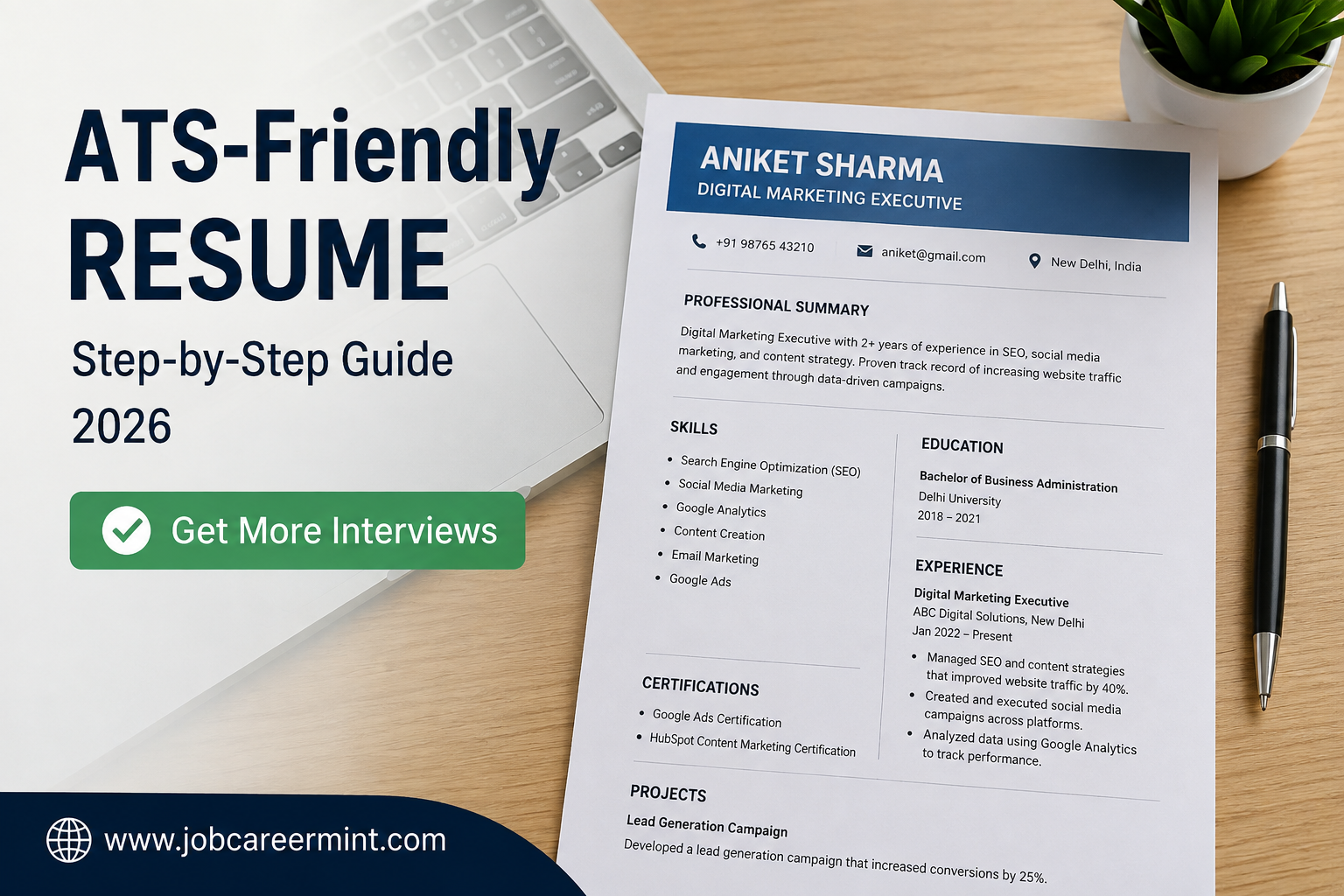
Looking for your first job or planning to switch careers? Your resume is the first thing recruiters see, and in 2026, most companies don’t read resumes manually at first. Instead, they use an Applicant Tracking System (ATS) to scan and shortlist candidates.
If your resume isn’t ATS-friendly, it may be rejected before a recruiter even opens it—even if you’re highly qualified.
In this complete guide, you’ll learn exactly how to create a professional ATS-friendly resume that increases your chances of getting interview calls. Whether you’re a fresher, student, or experienced professional, these expert tips will help you build a resume that works.
What Is an ATS Resume?
An ATS (Applicant Tracking System) is recruitment software used by companies to collect, organize, and filter job applications automatically.
Instead of reading every resume manually, recruiters often search for specific keywords, qualifications, skills, and experience inside the ATS database. Only resumes that match the job requirements are usually shortlisted for further review.
This means your resume should be designed not only for humans but also for ATS software.
Why Is an ATS-Friendly Resume Important?
Many job seekers have excellent qualifications but still don’t receive interview calls because their resumes cannot be properly read by ATS software.
A professionally designed ATS resume helps employers quickly identify your qualifications, work experience, certifications, and skills.
Benefits include:
- Higher chances of getting shortlisted
- Better keyword matching
- Easy readability for recruiters
- Professional appearance
- Suitable for most online job portals
- Works for government and private sector applications
Who Should Use an ATS Resume?
An ATS-friendly resume is useful for almost every job seeker.
- Freshers
- College Students
- Experienced Professionals
- IT Professionals
- Engineers
- Marketing Professionals
- Finance Candidates
- Healthcare Professionals
- Remote Job Applicants
- International Job Seekers
No matter your industry, creating an ATS-compatible resume improves your chances of getting noticed by employers.
Perfect ATS Resume Format in 2026
Choosing the right resume format is just as important as adding your qualifications. A clean, well-organized resume helps both ATS software and recruiters quickly understand your profile.
The most recommended format in 2026 is the Reverse Chronological Resume. It lists your latest education or work experience first, making it easier for employers to see your most recent achievements.
Essential Sections Every ATS Resume Must Include
Your resume should contain these important sections in a logical order:
- Full Name
- Professional Job Title
- Phone Number
- Professional Email Address
- City and State
- LinkedIn Profile (Optional)
- Professional Summary
- Work Experience
- Educational Qualification
- Technical Skills
- Soft Skills
- Certifications
- Projects
- Achievements
- Languages Known
Avoid adding unnecessary personal information such as religion, marital status, Aadhaar number, PAN number, or family details unless specifically requested by the employer.
How to Write a Strong Professional Summary
Your professional summary is the first section recruiters notice after your contact information. It should briefly explain who you are, your strengths, and what value you can bring to an employer.
A good summary focuses on your skills, achievements, and career goals instead of using generic statements.
Example:
Motivated Computer Science graduate with strong knowledge of web development, problem-solving, and teamwork. Passionate about building user-friendly applications and eager to contribute to innovative projects while continuously improving technical skills.
Best Resume Fonts for ATS
Simple fonts improve readability and ensure ATS software can scan your resume without errors.
- Calibri
- Arial
- Cambria
- Verdana
- Tahoma
- Helvetica
Use a font size between 10 and 12 for body text and 14 to 18 for headings.
How to Use Keywords Correctly
Keywords play a major role in ATS screening. Recruiters search for skills and qualifications mentioned in the job description, so your resume should naturally include relevant terms.
For example, if a company is hiring for a Digital Marketing Executive, important keywords may include SEO, Google Analytics, Content Marketing, Social Media Marketing, Email Marketing, and PPC.
Common ATS Resume Mistakes
- Using images or profile photos
- Adding tables or text boxes
- Using fancy graphics or icons
- Writing long paragraphs
- Submitting resumes with spelling mistakes
- Using an unprofessional email address
- Sending the same resume for every job
- Ignoring important keywords from the job description
How to Write Work Experience That Impresses Recruiters
Your work experience section should clearly explain what you accomplished instead of simply listing your daily responsibilities. Recruiters want to know the impact you created in your previous roles.
Start with your latest job and work backward. Mention your job title, company name, employment duration, and highlight your key achievements using action-oriented language.
How Freshers Should Write Their Resume
If you don’t have work experience, don’t worry. Companies hiring freshers understand that you are just starting your career.
Instead of leaving the experience section empty, focus on:
- Academic projects
- Internships
- Freelance work
- Volunteer activities
- Online certifications
- Technical skills
- Leadership roles
- Achievements and competitions
These sections help recruiters understand your potential even if you haven’t worked in a full-time job before.
Skills That Should Be Included
Your skills section should match the position you are applying for. Include both technical skills and soft skills that are relevant to the job.
Examples include communication, problem-solving, teamwork, leadership, MS Office, programming languages, digital marketing, data analysis, customer service, project management, or any other job-specific abilities.
ATS Resume Final Checklist
- Simple and clean formatting
- Professional email address
- Relevant keywords included naturally
- No spelling or grammar mistakes
- Latest information updated
- Correct contact details
- Projects and certifications included
- Saved in PDF format unless another format is requested
- Customized according to the job description
Frequently Asked Questions (FAQs)
Is an ATS-friendly resume necessary?
Yes. Many employers use Applicant Tracking Systems to screen resumes before they reach recruiters. An ATS-friendly resume improves your chances of being shortlisted.
Can I use colors in my resume?
Yes, but keep them minimal. A clean and professional design is always better than excessive styling.
Should I include a photo in my resume?
Unless the employer specifically requests one, it’s generally better to avoid adding a profile photo, especially for ATS compatibility.
What is the ideal resume length?
Freshers should aim for one page. Experienced professionals can use up to two pages if the information is relevant.
How often should I update my resume?
Update it whenever you gain a new skill, certification, project, achievement, or work experience.

Hi, I’m Adi Malik, the founder of JobCareerMint. I share the latest government and private job updates, career guidance, resume tips, interview preparation, and skill development content to help students, freshers, and job seekers build successful careers. My goal is to provide accurate, easy-to-understand, and valuable information that helps people find better career opportunities.